INFORMATION
Server Status · TFAR Setup · Kit Regulations
SERVER STATUS
Liberation
Operations
Training
TFAR INSTALLATION GUIDE
Task Force Arrowhead Radio (TFAR) bridges Arma 3 and TeamSpeak 3 for positional audio. Follow the steps below to install the plugin.
Requirements: TeamSpeak 3 client installed · Arma 3 with the TFAR mod active in your modpack
Note: You only need to install the TS3 plugin once — it stays active for all sessions.
Note: You only need to install the TS3 plugin once — it stays active for all sessions.
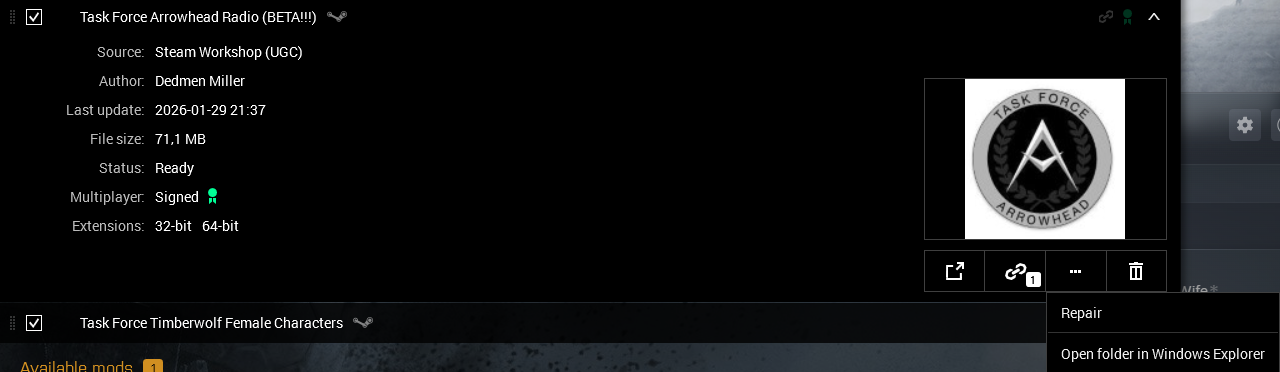
STEP 01
Open the Mod Folder
On the Steam Workshop page for Task Force Arrowhead Radio (BETA!!!), click the Open folder in Windows Explorer button on the right side. This opens the mod's local directory directly.

STEP 02
Find the TFAR Folder
In your Arma 3 mods directory, locate and open the folder named @Task Force Arrowhead Radio (BETA!!!).
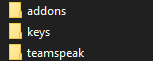
STEP 03
Install from the TeamSpeak Folder
Inside the TFAR folder you will find addons, keys, and teamspeak. Open the teamspeak folder and double-click the .ts3_plugin file to install it. Restart TeamSpeak if prompted.
KIT REGULATIONS
Authorized loadouts and equipment per role.
Rifleman
Authorized Primaries
Any assault/battle rifle and shotguns & SMG
Authorized Secondaries
Any standard pistol
Additional Equipment
Standard/MG/AT Ammunition
Disposable Anti-Tank
With SL Permission
Additional Permissions
None
Unit Limit
None
Autorifleman
Authorized Primaries
Any LMG/GPMG/assault rifle and shotguns & SMG
Authorized Secondaries
Any standard pistol
Additional Equipment
x1 GPMG per Squad if Wanted
Disposable Anti-Tank
None
Additional Permissions
None
Unit Limit
x2 per Squad
Grenadier
Authorized Primaries
Any assault/battle rifle w/underbarrel GL or rotary GL and shotguns & SMG
Authorized Secondaries
Any standard pistol/GL
Additional Equipment
GL Ammunition
Disposable Anti-Tank
With SL Permission
Additional Permissions
None
Unit Limit
x3 per Squad
Missile Specialist
Authorized Primaries
Any assault/battle rifle and shotguns & SMG
Authorized Secondaries
Any standard pistol
Additional Equipment
Any AT/AA Weapon
Disposable Anti-Tank
AT/AA Training Required
Additional Permissions
None
Unit Limit
x2 per Squad
Marksman
Authorized Primaries
Any assault/battle/marksman rifle and shotguns & SMG
Authorized Secondaries
Any standard pistol
Additional Equipment
Rifles of a 338 or higher calibre and scopes higher than x8 scopes
Disposable Anti-Tank
With SL Permission
Additional Permissions
None
Unit Limit
x1 per Squad
Combat Engineer
Authorized Primaries
Any assault/battle rifle and shotguns & SMG
Authorized Secondaries
Any standard pistol
Additional Equipment
Explosives, Breaching exsplosives & Detectors
Disposable Anti-Tank
With SL Permission
Additional Permissions
Engineer & EOD
Unit Limit
x2 per Squad
Medic
Authorized Primaries
Any assault/battle rifle and shotguns & SMG
Authorized Secondaries
Any standard pistol
Additional Equipment
Any medical equipment
Disposable Anti-Tank
None
Additional Permissions
Medic
Unit Limit
x2 per Squad
Team Leader
Authorized Primaries
Any assault/battle rifle (w/grenadier tag GL) and shotguns & SMG
Authorized Secondaries
Any standard pistol
Additional Equipment
Rifleman/Grenadier/Breacher (Role dependant)
Disposable Anti-Tank
With SL Permission
Additional Permissions
None
Unit Limit
x2 per Squad
Squad Leader
Authorized Primaries
Any assault/battle rifle (w/grenadier tag GL) and shotguns & SMG
Authorized Secondaries
Any standard pistol/GL w/Smoke & Flares
Additional Equipment
Rifleman/Grenadier/Breacher (Role dependant)
Disposable Anti-Tank
Allowed
Additional Permissions
None
Unit Limit
x1 per Squad
Support Specialist/Leader
Authorized Primaries
Any carbine/SMG and shotguns
Authorized Secondaries
Any standard pistol
Additional Equipment
Toolkit & Medical Supplies
Disposable Anti-Tank
None
Additional Permissions
Engineer & Medic
Unit Limit
N/A
Additional Requirements/Limitations
Other
Any position above Rifleman requires it's respective training
Other
Any role outside of marksman has a scope limit of x8
Other
Any role outside of autorifleman is limited to 40 round magazines (Exceptions apply to weapons who only have magazines above 40 rounds I.E. P90)
Other
Any role that a TL or SL is counts towards unit limit
Other
Only riflemen are permitted to carry ammunition outside of the weapon they are carrying